Finished the Scarf!

I just finished my first scarf!

Is it everything that I hoped that it would be? No..

But I am proud of myself and I will be wearing it this December! It is the coziest thing that I now own ❤

Next time I think that I will only create 10-15 stitches for the length, as my scarf looks a tad like a blanket, but hey I’m cool with it. Blanket Scarf = a cozy, warm, happy Michelle.

If I do end up making another scarf over winter break I’ll upload it online so that you can see my knitting progress. Thanks for coming on this journey with me! Have a fabulous December 🙂

Michelle

The be-all end-all of FreshGrade

FreshGrade Report

As you may have noticed over the past three months I have been researching FreshGrade. Now that my class is coming to an end I am going to summarize everything FreshGrade related for you. Enjoy:

What is FreshGrade?

My first ever post pertaining to FreshGrade defined it as “a digital portfolio and assessment platform that makes learning visible for teachers, parents, and students.” Although this is completely true, I think that I can add a few more details in now for you. FreshGrade is an online portfolio and assessment platform that helps educators, parents, and students have deeper conversations about learning. One of the founders of FreshGrade is Lane Merrifield, the co-founder and CEO of Club Penguin, one of the largest virtual worlds for kids. Disney later acquired club Penguin for 350 million dollars, which provided the capital used to create FreshGrade. FreshGrade was created to reduce teacher workload, improve learning outcomes, and engage parents and students. Specifically, it is used in schools as a digital portfolio; teachers provide feedback and track progression, parents are given on-going communication about their children’s learning, and students are given the opportunity to self-reflect on their growth. When creating an account you can download FreshGrade from freshgrade.com, from the iTunes App Store, or from Google play.

Important Features:

  • FreshGrade is integrated with Google translate so that teachers, parents, and students can read and write in the language of their choosing.
  • Voice to text. To use this feature on the FreshGrade app you can simply click on the microphone on your device, speak your comments, and the app will translate your words directly to text.
  • Free Webinars. Please utilize these! Especially before starting to use FreshGrade, they are extremely helpful and provide you with a lot of good information.
  • As a teacher you can create assessment tools, activities, objectives, and filter information on this application.
  • As a student you have access to comments that have been named, classroom announcements, and previous report cards. You can also email teachers directly, upload work and make comments, add different classes to different portfolios, and view your portfolio history.
  • As a parent you get notifications and emails that let you know once your child’s portfolio has been updated. You can email the teacher, look at your child’s portfolio, view their portfolio history, look at report cards that have been uploaded, view any invites or announcements, and download any photos added to FreshGrade.


 Pros & Cons:

After further research I have realized that FreshGrade has corrected some of my original cons. With that being said, here is the new and improved accurate list of FreshGrade’s Pros and Cons.

Pros of FreshGrade Cons of FreshGrade
Helps teachers, parents, and students track learning. Need an email to access FreshGrade.
Helps initiate conversations between parents and students; better enabling parents to support their children’s learning. Not all parents and students have access to a computer or smart phone outside of school.
Allows students to see online what they are expected to learn. Teachers need to have an appropriate school device readily available to capture learning in the classroom.
Greener option than the paper portfolio as less paper is being used. Lacks some tools that demonstrate creativity, such as drawing tools.
Individual profiles are available for the student, teacher, and parent. Some schools have a no cell phone policy. Is it hypocritical to be using FreshGrade in these instances?
It is an on-going assessment tool. One form of assessment does not fit all. Some parents, students, and teachers may be reluctant to use FreshGrade. Proper scaffolding must take place when implementing it into the classroom.
It is an extra way to check in with parents. Parents no longer need to wait for report cards or parent teacher interviews to be informed about their children’s learning.  
Can lead to increased student and parent participation.  
It is a form of digital literacy that can be incorporated as a tech tool to advance student learning.  
·       Notifications and emails let you know when your portfolio has been updated.


Things to Keep in Mind when Using FreshGrade:

  • Less is more: We want to ensure key areas of learning are shared and that we don’t overwhelm parents.
  • Carefully choose evidence that demonstrates and shows student learning.
  • Make clear assessment decisions: Decide which key assessment matter most and avoid overwhelming the portfolio.

Privacy Implications:

In FreshGrade’s privacy policy one major point that is described is the difference between personal information and aggregate information. Basically, personal information includes names, addresses, telephone numbers, email addresses, etc. and aggregate information is data collected from which individual user identities have been removed. Personal information cannot be sold and shared but aggregate information can. Like most other websites FreshGrade automatically collects usage information once you visit their site. This information is collected through cookies. Depending on your mobile device you may not be able to reject cookies. Additionally, if you do not accept FreshGrade’s cookies, you may not be able to use some of the network’s features or services. On a side note, once an account is deleted aggregate information can still be utilized. FreshGrade also has an extensive liability clause that basically protects them from everything. By agreeing to use the application you are waiving the right to a trial by jury, the participation in a class action, collective action, private attorney general action, or other representative proceedings of any kind.

What does this mean?

Take from it what you will. Overall I think that FreshGrade is a fabulous resource to use. Although there are cons, FreshGrade can be a source of extremely valuable learning opportunities. Of course, you are going to get out of FreshGrade what you put into it. Therefore, if you are committed to this resource and put time and effort into making it great for your students the possibilities are endless. I hope that in my future career I have the opportunity to use it.

Thank You Lovely Readers:

Thank you to all of the individuals who took the time to keep up with my weekly blogs. I hope that you learned a few things and enjoy the Christmas holiday as much as I plan too!

One Yarn Ball Left

I attached my last ball of yarn last night. Unfortunately, I did this at 11 pm when I was tired and ended up tying it to the wrong end! After a slight panic attack I was able to fix it and now you can’t even tell. Fingers crossed that I tied everything properly and it doesn’t unravel as soon as I put it on.

The next time I make a scarf I think that I will buy four balls of yarn. I bought three and I like my scarfs extra long so it just isn’t cutting it for me yet. I have hope that I’ll be able to finish knitting with my last ball of yarn by December 5th. If so, I will upload a photo of me wearing it! Stay tuned for the final product.

Weekly Progress:

scarf

Last Day of Class

Today is my last day of EDCI 336: Technology Innovation in Education.

Today we are:

  1. Programming with Scratch
  2. Learning about Multi-Access Learning
  3. Controlling a Video Conference Robot

Scratch:

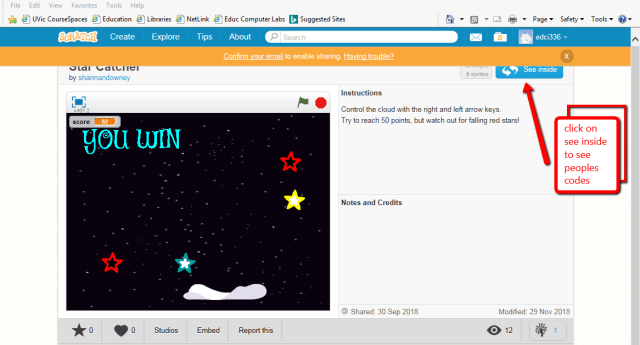
First, we got to play around with scratch. Scratch is a free computer programming application that allows people to create a wide variety of interactive media projects. Some ways in which we discussed using scratch in an educational capacity is through the use of programming fun games, story telling, math & geometry, and physics (ballistic arcs). Specifically, scratch can allow us to learn about x and y coordinates, math operations, logic, and design.

Scratch is great as it is a way for students to engage in purposeful play. For instance, during my school observations I have noticed that a grade four class is working on their typing skills. Perhaps they could utilize scratch to create interactive stories. This is a way to incorporate digital and critical literacy in a fun way into the classroom.


scratch2scratch_game

Multi-Access Learning:

Distributed Learning Prompt #1

Distributed learning is an instructional model that allows teachers, students, and content to be located in different locations. Using distributed learning can be extremely useful for students who have anxiety or live far away. Although sides is a valuable program it may lead to exclusionary practices as students are being taken away from their classroom and classmates. Incorporating distributed learning into the classroom allows students to learn outside of the classroom but still form meaningful connections with the teacher and their peers. Using different modalities allows for student differentiation. This is important as each student learns differently.

Face to face or online courses? Blended?

Multi-access–> bringing the learning to the learner. Modality is becoming personalized not categorized. In multi-access there are various layers. Learning can occur online, through video conferencing, and face-to-face.

TIE Lab at UVic works toward this multi-access learning.

Cyber Proxy: Can allow a student at home to be on campus via teleprescence. This is an embodied perspective.

Experimenting with the beam robot TIE:

This slideshow requires JavaScript.

Verdict: I want one. This thing is so much fun to watch & drive.

The perfect ending to a great class.

Webinar: Journey to a Grade Free Classroom

I only have 12 days left until I am off for winter break. With that in mind, this will probably be the last summary of a webinar that I provide for you. Because this is my last opportunity to collect information for you about FreshGrade I want to summarize a webinar that will incorporate new information into my own (and therefore your own) understanding.

So what webinar have I chosen? Journey to a Grade Free Classroom by Cari Wilson.

  • Wilsoncwilson@wvschools.ca
  • @kayakcari

Why have I chosen it? I am extremely interested in no grades. Further, I believe that at some point during my own teaching career we will have moved towards a no grades policy.

Lets dive into the webinar facts:

Wilson works in Vancouver helping students and teachers implement technology and innovation into the classroom. This webinar describes her journey to a grade free classroom using FreshGrade.

Wilson is a seventh grade teacher and became tired of sending her students to high school with the view that they were a C- student, a B student, etc. Wilson thought that something should be done about letter grades and applied for (and obtained) an innovation grant that would allow her to explore the question, “will replacing letter grades with learning descriptors result in increased student self image and better understanding of personal strengths and weaknesses as students head off to high school?”

56 out of 60 students participated in the first year of this pilot project. The letter grades normally used were replaced with descriptors, “exceeding, fully meeting, minimally meeting, and not yet meeting.” During  the second year of the pilot program she started using FreshGrade more with students as a way for them to self reflect and assess themselves. In the third year of this program things started to really take off as the school decided to incorporate this no grades policy from grades 4-7. New descriptors were created, “beginning, developing, acquiring, and exceeding.” Five years into the program things have been successful and the newest descriptors include, “beginning, developing, applying and extending.’ (*Very growth mindset*)

Wilson recommends going grade less and states that you must be bold (take baby steps), be clear (what do you want to get out of this), and be reflective.

This slideshow requires JavaScript.

I really liked this video as it gave me hope that one day all schools will be removing grades. This is something that I believe is really important as grades don’t always properly reflect our students learning. Unfortunately, I didn’t learn anything new about FreshGrade in this webinar. As stated previously, FreshGrade was only briefly mentioned with regard to its usefulness for students abilities to reflect and assess themselves online.

In conclusion,

Thank you for reading my posts about FreshGrade! I hope that they have been as informative for you as their creation has been for me. As you can imagine the ideas and information that I have collected pertaining to FreshGrade over the past 12 weeks has evolved. Because of this, I am going to make one last post summarizing my key findings on FreshGrade. It will be uploaded sometime in the next 12 days! So please check back with me if you would like a refresher on all things FreshGrade.

Thanks for the read.

Half a Scarf

This week I tried to do as much knitting as I could as there is only 12 days left of class before winter break! I was able to finish my first ball of yarn and attach a second to continue the scarf. I’m hoping that I can finish all three yarn balls in the next 12 days. If not, I can always make my scarf into an infinity scarf – but I do prefer the regular ones.

Below is my progress:

46526021_2131203760231474_3958916642305474560_n

The daily knitting begins…

Ttyl for now.

Scarf Progress Continued

Hello folks!

Surprisingly, in the past ten days I have done a ton of knitting. I have finally found knitting to be extremely relaxing. It’s amazing to just turn on Netflix and be able to knit so easily without worrying about missing any stitches. With that being said, although I have completed some good progress on my scarf I still have A-LOT to do. With only a few weeks left (17 days to be exact) I am going to be cutting it close. Knitting is extremely time consuming! To finish this scarf I think that I’m going to have to do at-least thirty minutes of knitting a day. So.. wish me luck.

Here’s my weekly progress:

46474567_253959408617247_9169638779051311104_n


Im slightly worried that I may not have bought enough yarn. Because I wanted my scarf to be extra thick I created 20 stitches instead of the ‘normal’ 15. That may be why Im running out of yarn so fast & why its taking so long to make. The more you know..

Webinar: How to use FreshGrade in an ESL/ELL Classroom

certificate-of-completion-for-webinar-how-to-use-freshgrade-in-an-esl-ell-classroom

This webinar was not quite the video that I thought it would be. I thought that it might be a webinar revolving around how to help non-english students through the use of FreshGrade but instead it is a webinar describing a teachers use of FreshGrade with her English students who are learning to speak French.

Nonetheless it still provided some good examples as to how FreshGrade can be helpful when learning a new language.

The person who ran this webinar is named Michelle Grenne (@MGreenehansen). She has been teaching French for the past 17 years, grades 9-12. Greene works at Stratford school which is famous for its theatre productions. She uses the hashtag #freshgradeL2 if you wish to discuss similar FreshGrade experiences over Twitter with her. She found FreshGrade through Twitter one day and decided to try it out for herself. Immediately she realized that the application has immense potential for helping students learn French. Basically, what she found was that FreshGrade promotes speaking in French through their recording option. This allows class discussions to take place online as students record themselves speaking French on the iPad throughout the class.

Some key points that were discusses included FreshGrades ability to:

  • Encourage shy students to speak
  • Challenge students to use vocabulary in new contexts. For instance, assessment tools can be created to mark students online discussions with regard to the amount of new vocabulary that they are using on the app
  • Motivate students to be more engaged in classroom activities as their assessments about class participation are shown on their portfolios
  • Build confidence in French by allowing students to see their progression over time
  • She likes how she can track student progress online as there is less paper used
  • It also helps her with exit slips as students can post their answers quickly to the application at the end of class. This allows her to see students proficiency in what they have learned on a particular day

Although the title this video is a tad misleading it does provide some helpful information pertaining to how the recording option of FreshGrades app can allow students to practice a second language more comfortably. With that being said, I think that FreshGrade can be an extremely useful tool for middle school French (6-8).

This slideshow requires JavaScript.


Webinar: Introduction to FreshGrade for Parents

A customer care representative for FreshGrade ran this webinar. Of course, the beginning hook was ” FreshGrade communicates student learning giving parents a window into their students classroom. Parents can download FreshGrade on any IOS or android device or web browser using their home or a public computer.” (I feel like I could recite what FreshGrade is to you now that I have heard the same sentences over and over again.)

There was a short audio clip that was presented from a parent using FreshGrade. Described below is her response:

Her son was in grade five when they started using FreshGrade and it is has been truly impactful to use. It is a window into the classroom through videos, pictures, and comments that has made her understand what her child is doing and made her better able to support her child at home. Further, it is the highlight of her day when she gets notifications about her son.

Some other facts presented throughout the webinar:

  • Notifications and emails will let you know when your child’s portfolio is updated.
  • Can get access to all of your childrens accounts at the same time.
  • You have the option to email the teacher, look at the portfolio, view portfolio history, look at report cards, view any invites, and view announcements.
  • You can download any photos added to FreshGrade.

I wont walk you through how to create an account as I did that with the student webinar but I have uploaded photos with easy to follow steps.

This slideshow requires JavaScript.


As you can tell this was a shorter webinar. It would be useful for a parent to watch that is new to FreshGrade. If you have already read my other blogs with regard to FreshGrade then you probably didn’t learn anything particularly new and exciting but nonetheless now we know that this webinar is exclusively for NEW FreshGrade parent users.

certificate-of-completion-for-webinar-introduction-to-freshgrade-for-parents


Science Journal (Google)

Today in my tech class we downloaded Google Science Journal from the app store and experimented with some of its activities. One particular activity that I partook in was “getting started with light.”

For some unknown reason whenever something Google related comes up in this class I cringe. I find Google applications to be confusing and try to stay away from them whenever possible. Unfortunately/ fortunately, I had to participate in this lecture and I found the app for the Science Journal to be okay to use. I feel like after I  watch a few more tutorials on it I could become a pro. #Growthmindset

This slideshow requires JavaScript.

After some playing around on the app I began to really like the light experiment because you could physically see how your sensor card is measuring lux, something that I had literally never thought of before. I can see how this Google application could be implemented into the classroom with iPads as it is a fun experiment for students to do themselves and it provides helpful explanations of what is going. I can see this being utilized in more of a grade four or five classroom at the start of a science unit on light. Unfortunately, I don’t think that it would be very useful for k-3 as the language used on this application is quite complex. Overall, I do think that it is a fun way to get older students interested in a subject area that they might not know much about.