Last Day of Class

Today is my last day of EDCI 336: Technology Innovation in Education.

Today we are:

  1. Programming with Scratch
  2. Learning about Multi-Access Learning
  3. Controlling a Video Conference Robot

Scratch:

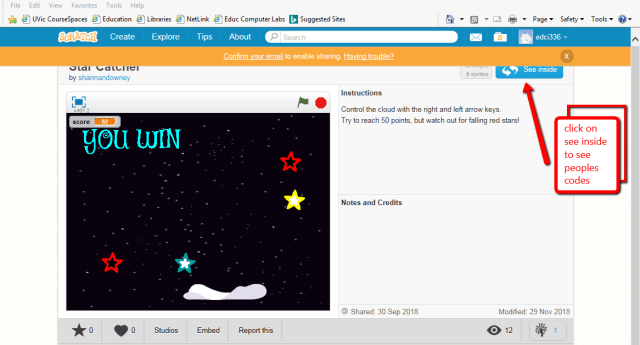
First, we got to play around with scratch. Scratch is a free computer programming application that allows people to create a wide variety of interactive media projects. Some ways in which we discussed using scratch in an educational capacity is through the use of programming fun games, story telling, math & geometry, and physics (ballistic arcs). Specifically, scratch can allow us to learn about x and y coordinates, math operations, logic, and design.

Scratch is great as it is a way for students to engage in purposeful play. For instance, during my school observations I have noticed that a grade four class is working on their typing skills. Perhaps they could utilize scratch to create interactive stories. This is a way to incorporate digital and critical literacy in a fun way into the classroom.


scratch2scratch_game

Multi-Access Learning:

Distributed Learning Prompt #1

Distributed learning is an instructional model that allows teachers, students, and content to be located in different locations. Using distributed learning can be extremely useful for students who have anxiety or live far away. Although sides is a valuable program it may lead to exclusionary practices as students are being taken away from their classroom and classmates. Incorporating distributed learning into the classroom allows students to learn outside of the classroom but still form meaningful connections with the teacher and their peers. Using different modalities allows for student differentiation. This is important as each student learns differently.

Face to face or online courses? Blended?

Multi-access–> bringing the learning to the learner. Modality is becoming personalized not categorized. In multi-access there are various layers. Learning can occur online, through video conferencing, and face-to-face.

TIE Lab at UVic works toward this multi-access learning.

Cyber Proxy: Can allow a student at home to be on campus via teleprescence. This is an embodied perspective.

Experimenting with the beam robot TIE:

This slideshow requires JavaScript.

Verdict: I want one. This thing is so much fun to watch & drive.

The perfect ending to a great class.

Science Journal (Google)

Today in my tech class we downloaded Google Science Journal from the app store and experimented with some of its activities. One particular activity that I partook in was “getting started with light.”

For some unknown reason whenever something Google related comes up in this class I cringe. I find Google applications to be confusing and try to stay away from them whenever possible. Unfortunately/ fortunately, I had to participate in this lecture and I found the app for the Science Journal to be okay to use. I feel like after I  watch a few more tutorials on it I could become a pro. #Growthmindset

This slideshow requires JavaScript.

After some playing around on the app I began to really like the light experiment because you could physically see how your sensor card is measuring lux, something that I had literally never thought of before. I can see how this Google application could be implemented into the classroom with iPads as it is a fun experiment for students to do themselves and it provides helpful explanations of what is going. I can see this being utilized in more of a grade four or five classroom at the start of a science unit on light. Unfortunately, I don’t think that it would be very useful for k-3 as the language used on this application is quite complex. Overall, I do think that it is a fun way to get older students interested in a subject area that they might not know much about.


Future Day

Today in class we learned about (and got to play around) with Virtual Reality, Multimedia Learning Theory (sketch-noting), Augmented Reality, QR codes, and 3D Designs with Tinkercad. Here is a brief description of everything:

Virtual Reality: The University of Victoria has its own virtual reality gaming centre and today in class we were allowed ten minutes to play different games on it. Its extremely awesome and entertaining. I highly recommend trying it for yourself if the opportunity arises.

45743105_281111592538255_3734653026569289728_n

Multimedia Learning Theory: A cognitive theory based on the assumptions that there are auditory and visual channels for processing information that have limited channel capacity. For information to be incorporated into long term memory prior knowledge should be utilized. One way in which to activate Multimedia Learning Theory is through sketch-noting. Sketch-noting allows for a combination of words and quick images that allows the note-taker to listen, digest, and capture on paper the essence of what has been heard.

Augmented Reality: We saw a brief tutorial on how a school incorporated augmented reality into a history lesson through ARIS. Another way that augmented reality has been used is through Pokemon Go!

image-uploaded-from-ios-13.jpg

QR codes: We briefly discussed QR codes with regard to augmented reality.

frame

Here is a QR code that leads to my blog with any scanner application. Enjoy.

3D Designs with Tinkercad: We also briefly played around with Tinkercad creating our own 3D dice. We didn’t actually print our dice (although we could have if we wanted to pay around 80c for them). I found Tinkercad to be a bit confusing but I do like the idea of 3D printing.

This slideshow requires JavaScript.

There you have it,

My Friday in a nutshell.

Webinar: Expert Panel on Portfolios & Assessment

The webinar “Expert panel on Portfolios & Assessment” discusses assessment, portfolios, and 21st-century learning with FreshGrade. Four presenters discuss their experience and ideas about FreshGrade.

This slideshow requires JavaScript.


Kelli Vogstad is a vice principle who uses FreshGrade. Feel free to follow her blog               —-> Kellivogstad.com

In this webinar Kelly discusses how to best document learning on FreshGrade. She states that the documentation must show growth over time, provide reflection, and bring in the core competencies. To make learning visible on FreshGrade we must include the curriculum activity and task, but move beyond the picture of the worksheet or test. Our pictures need to show growth and learning. Further, FreshGrade should have two prominent voices: student and parent. Students should be encouraged to document what they have learned, what they still need to work on, and their plans to move forward. Additionally, parents voices should be included but their comments should move beyond praise.

This slideshow requires JavaScript.

Damian Cooper is an assessment consultant who works to make assessment relevant for students and less work for teachers. Currently he is working on validating the use of observation and conversation as assessment tools.

Damian discusses the importance of a curriculum that focuses on know, do, and understand. He states that there is often an over reliance on factual knowledge and that we need to move toward observing students skills, competencies, and conceptual understanding. One way in which we can observe these areas is through FreshGrade. FreshGrade allows students to record information which we can view as evidence of learning on smartphones and tablets. This type of learning and assessment challenges the traditional marking approach but can be more beneficial as it allows students to gather their own evidence.

This slideshow requires JavaScript.

Wanny Hersey is a superintendent in Northern California.

Wanna discusses how FreshGrade is utilized to document student achievement and growth at her project based learning school. The school that she describes utilizes focused learning goals. According to her, these goals and certain 21st century skills can be hard to demonstrate in a traditionally academic sense. In her opinion, FreshGrade is able to capture the entire learning experience of the students. Students are able to post about their goals online, which relates to metacognition. This also promotes engagement and conversations. Some challenges that Wanna describes includes the amount of devices available for uploading. For instance, you may need to take time to create a system for uploading if you only have access to a small number of devices. You also need to take time to train parents, teachers, and students about what strong evidence looks like. Further, some of the benefits discussed include the ability to document skills such as, collaboration and critical thinking. Additionally, because many teachers can have access to different student portfolios collaboration between teachers is common, and teachers can use FreshGrade as proof of their own professional growth.

This slideshow requires JavaScript.

Karen Fadrum helps teachers understand how to utilize portfolios and assessment.

Karen mentioned that while using FreshGrade teachers need time and space, access to information, and a connection to the community. When shifting to using FreshGrade, teachers are learners and need to make FreshGrade work for them and their students. Some tools that can be utilized to support teachers includes: readily available technology, documentation tools for teachers and students, access to creative apps, and flexible learning spaces. Further, teachers should be given professional learning opportunities to share their FreshGrade experiences with each other.

This slideshow requires JavaScript.

I won’t go over the q & a part of the video as it is twenty minutes long and I am ready for bed! But please watch the video for yourself! There is plenty of fabulous information located at the end of the video –> –> –> –> –> https://learning.freshgrade.com/courses/368996/lectures/5632299

Here is my cute certificate (extrinsic motivation at its finest)

certificate10

Thanks for reading,

Another webinar summary will be uploaded on the weekend!

Class Activities: Google Classroom + Twine

Hello,

If you cant guess by the title, today in class we discussed Twine and Google Classroom. In formal terms, Twine is an open-source tool for telling interactive, nonlinear stories.

I had never heard of Twine before today but after trying it I am amazed.. Twine is extremely fun to use! To me, it is an online story version of the game would you rather. You can create different scenarios in your story that readers can explore. Unfortunately, the stories that you create are hard to publish. Overall, it is a fun activity to do that can tap into your creativity and humor quite quickly. To me, Twine is an A+ downtime activity to partake in.

Take a look for yourself below

screen-shot-2017-06-03-at-4-39-49-pm

Here is a link if you want to start creating your own stories: http://twinery.org/2/#!/stories

We also created our own Google Classrooms

Personally, I have always had an intense & passionate dislike for anything Google Doc related. I find Google Accounts to be confusing and always end up doing the wrong things when editing a Google Doc. But… creating a Google Classroom was extremely easy! Our teacher gave us a Google Classroom Workshop and then we played around with the program for awhile. I can definitely see myself creating a Google Classroom at some point in my career, although I am partial to FreshGrade now. Below is a video of me playing around on the site. Enjoy!

Inquiry Idea: K-5 + Technologies Learned in the Classroom

Hello,

Unfortunately I have been putting this class on the back burner. But, not to worry I will be catching up this weekend! Get ready for at-least 2 new blogs this weekend.

Specifically, today in class we were asked to develop a k-5 appropriate inquiry using some of the technologies that we learned in class. The technology that I will be sharing with you is Google Photos, Screencastify, and Jing.

One important thing that I learned today when collecting photos from google is to go to “tools -> usage rights -> labeled for noncommercial reuse with modification. This now allows us to use photos that are copyright safe. (Something that I have never done in the past.. Yikes)

Screencastify is super cool as it is an extension from Google Chrome that allows us to record our screen activity. Jing is also a screencasting computer program but it allows us to take a photo of our screens and edit them (ie. creating arrows or descriptions).

For my Inquiry idea I will be creating a Grade 1 Guided & Controlled Science Inquiry based on foxes! This topic fits into the BC curriculum as some of the content that must be covered includes the names of animals, the structural features of animals in the local environment, and the behavioural adaptions of animals in the local environment.

Once this is shown to the class I will ask: “What do you see? What do you know? & What do you wonder?” The answers to these questions will be the basis for the inquiry.

If I wish to present more photos to the class I can select some noncommercial rights images from Google and edit them using Google Photos. The process is uploaded below.


Here is the edited photo Red Fox (Vulpes vulpes), Norway.

Here is the original photo Red Fox (Vulpes vulpes), Norway.

As you can see I lightened up the photo and cropped it.

2018-10-26_1056

Here is a photo of me using the application Jing. As you can see I am using Google Photos to edit this photo. I have added an error to the edit button so that I don’t forget how to use this application once I get home and add it to my own computer.

FreshGrade Implementation

Although I was going to look into FreshGrade’s privacy settings this week, there was a surprise visit in one of my classes from a teacher who actually uses FreshGrade with her students! Because of this, I am going to post what I have learned about FreshGrade from this talk. So here we go…

The teacher who talked to us gave us examples of the guidelines for reporting using FreshGrade that are used in her school district. Some of these guidelines revolved around student progress reports. During these reports teachers in their first year of using FreshGrade will continue to use formal progress reports at defined reporting times during the school year. On the contrary, teachers in their second year of using FreshGrade may provide summative comments at key times during the year rather than providing progress reports. These summative comments will appear as part of the FreshGrade portfolio. All students will receive a final written report that summarizes their learning over the course of the school year. Additionally, the final written summative report will include a student self-assessment of the core competencies.

Some of the portfolio requirements include a minimum of one piece of evidence of learning each month in the key areas of reading, writing, and numeracy. Additionally, a minimum of one post per year in other required areas of study. Lastly, summative information for reading, writing, and numeracy should be reported in the student portfolio at least two times per year.

With regard to letter grades and performance, neither letter grades nor percentages are used to indicate student performance in all elementary grades (k-5). Although, student progress may be communicated using language consistent with the Ministry of Education Performance Scales in areas of reading, writing, and mathematics. For grades 4 and 5 letter grades may be communicated verbally to parents who request them but letter grades are not to be communicated via electronic portfolios.

Some of the forms used by the school included a electronic portfolio checklist for teachers new to FreshGrade, a parent informed consent form, a web-based tools consent form, a parent letter for mid-year student progress reports for teachers in their second year of FreshGrade use, sample student progress reports using FreshGrade, a core competency self-assessment form, prompts for student self-reflections, examples of documentation, and guiding principles and beliefs about reporting.

Some other key attributes included attendance information, which should be posted two times per year and as part of the final summative report. Further, an indication of the school name must be included on student progress reports and summative reports.

Some cautions discussed about using e-portfolios included:
-Less is more: We want to ensure key areas of learning are shared and that we don’t overwhelm parents.
-Carefully choose evidence that demonstrates and shows student learning.
-Make clear assessment decisions: Decide which key assessment matter most and avoid overwhelming the portfolio.

This is only some of the information that was discussed in class. I hope, with permission, to include more information later in the week. For now I will be adding this information to my word document that holds my tech inquiry assignment.

Thanks for reading!

tumblr_oujsa9KLpn1uvv5gho1_500

^ Pro of FreshGrade ^

Video & Audio Editing


Today in class we learned about video and audio editing. I really enjoyed using iMovie to try out different titles and add goofy credits. I also liked playing with the audio of the movie by adding sound effects. I am excited to keep developing my iMovie skills at home so that I can upload my iTunes account and add catchy music to my videos.  (Although there are copyright implications, sigh) Unfortunately, I didn’t like GarageBand as much. I found it harder to use and had trouble getting started and exploring. I guess I just need more practice!

Thats all for now- Another two competencies down.


Pacific School of Innovation and Inquiry

learningstorm.org

Last Friday my class visited the Pacific School of Innovation and Inquiry. Although I had never heard of this school before I was pleased to find out that it is a high school that personalizes education through a formal inquiry process where learners create projects and activities that take them through the curriculum on their own. Seeing this type of learning environment in person was very eyeopening for me.

Previously, I had loved watching the documentary “Most Likely to Succeed” in class. Although there are differences between HTH and PSII, both schools are doing some pretty different stuff compared to the traditional model of education. Plus, watching a movie barely compares to physically visiting a school. While walking around PSII I could feel the energy of the students and see how well that type of learning environment can work. Every single student was engaging with something throughout the hour that I was there. While talking to different students I felt like I was having a conversation with my own peers. I could see each student light up when talking about their current project. They were genuinely interested in the material that they were learning about and they loved talking about it. To me, it is without a doubt the future of education.

One thing that I would like to learn more about at PSII is assessment. Jeff Hopkins briefly described this process stating that students and teachers work together to discuss evaluation and grading. I got the sense that there is a lot of formative assessment during the year where teachers are working one-on-one with students, although there is still summative assessment where student learning needs to be compared to curriculum standards.

On another note, I really liked the integration of technologies like WordPress and Trello into the classroom, as I didn’t start using these technologies myself until taking this course. In fact, many of the students Trello accounts were much more creative and better organized than my own. It’s super awesome that students are getting acquainted with these sites as I believe that the internet provides a vast amount of entrepreneurial opportunities. If students are already starting to explore some of their ideas online they could have a successful business already built by the time that they graduate high school.

It was also interesting to hear how students are using virtual reality in the classroom in different ways. For instance, some students were using it for building, others gaming, and others art (I have mostly viewed virtual reality as a type of 3D gaming device, but it can be used for so much more!)

Although I can’t describe everything that I loved about this school, because there simply is too much, I encourage you to browse the schools website https://learningstorm.org/ and watch Jeff Hopkins TED talk about an inquiry approach to education.


Most Likely to Succeed Film


Last class we watched a film called “Most Likely to Succeed,” which is a documentary examining the history of education in the United States. This film revealed some of the shortcomings of the conventional education system in today’s increasingly technological world. Specifically, this film followed the problem and project based learning strategies used with students at High Tech High. Problem based learning requires higher order thinking skills that go beyond the level of understanding required by traditional classes that have clearly defined questions to be solved. The problems presented can often be too difficult to be solved individually and therefore require teamwork and collaboration between students. Additionally, project based learning allows students to increase their  autonomy by giving them control to create their own projects, although teachers still define parameters and completion dates. For instance, in the film all of the students in the school were working towards a project that would be displayed at the end of the year in front of other students, teachers, and parents. The project based approach to learning  challenged students to overcome problems (such as, working with others, defending points of view, dealing with frustration) in order to produce a project of substantial work.

Watching problem and project based learning was super interesting because I could see how students were being prepared for future careers. On film it looked like students gained confidence, increased their communication skills, learned how to critically think, and became more creative. This is awesome because schools today aren’t necessarily preparing children adequately for the workforce (in the way that education does not always lead to a job.) One of the reasons that this has occurred is due to an increase in technology that decreases traditional white-collar jobs. (I have seen this in action with friends and siblings and worry about it myself!) For a large majority of my own educational experiences I feel like I have only been taught how to memorize things effectively and take tests – without retaining a majority of the information presented to me.

Although I think that this new school is extremely forward thinking and fantastic, I can see how certain students might have problems with the way that things are done. For instance, there is lots of group projects and presentations which may make more introverted students feel burnt out. (It would be interesting to see if schools could be built and run according to learning styles or different temperaments? Why are we still stuck using one similar model of education when students are extremely diverse? Does more research need to be done? Are we too closed minded? Is it even possible?)

I hope that wasn’t too long for you..Thanks for reading!